This is only my first impressions of what I have found with my 2 Windows 8 devices on our short trip to Walt Disney World however I wanted to take a few moments to write this report.
Microsoft Windows 8 Pro Surface Tablet
First - the Microsoft Surface Pro is a great device. It has for the first time in about a decade given me the confidence to travel without a laptop. For me a laptop has always been a must when travelling. I have probably had to "remote in" to handle problems at work, write reports and more tasks dozens of times. Without a laptop this would have been impossible. I know that the Surface has enough power to handle most if not all laptop tasks, with the possible exception of video editing. However to get to most of these destinations I must fly. Airports and Airplanes are often very busy and crowded places. Personal space is often difficult to find. Maybe it's just me but I often think of the Star Trek episode, "Mark of Gideon" whenever I am in these crowded places. I found that the Surface tablet is bigger and bulkier then is necessary if you simply want to play games, listen to music, surf the internet, read a book etc. The IPAD is a much better device for these tasks, It is lighter, smaller and handles those simple tasks just fine.
I have been suggesting for months now that the Surface or other Windows 8 devices are better "professional" devices for those on the move. Here the Surface shines. Once at the resort I was able to truly read email through a Outlook 2013 client, open documents in Word and Excel and even write this fine article with great ease. None of this could have been done on my IPAD.
Also once at the resort and with personal space I was able again to use the Surface to read the newspaper and other tasks normally handled with my IPAD.
In fact after writing this article, I will unsnap the magnetic keyboard, flip the tablet vertically and finally sit back, relax and read the online versions of my local newspapers before heading back to the parks!
Windows 8 Phone
My biggest problem here was the camera on the Nokia Lumia 822. I found that the shutter speed was often very slow and clunky. Snap the picture and sometimes you need to wait a few seconds for the shutter to kick in and sometime it kicks in and takes 3-4 pictures at once. As our first day went on I discovered that if you use the physical shutter button things work a bit better. In addition it is important to remember that this problem probably rests with the physical phone and not Windows itself. Verizon Wireless currently only has 2 Windows 8 phones so here is hoping that more models are released soon.
The other problem I had on day 1 was that twice, once in Philadelphia and once in Orlando the phone lost cellular service. I was able to fix this both times by powering it off and back on. I am also hoping that this was a fluke as well.
A nice feature of the Windows 8 phone is that all photos (and videos) you take can be set to automatically upload to your SkyDrive account. If you were to lose you phone this would indeed be a life saver. Once back at the resort I was able to browse my photos immediately on my Surface tablet through SkyDrive. From here you can easily view, edit and organize your new photos.
Well my journey with Windows 8 at Disney World continues so I must go.
Have a Magical Day!
Sunday, March 10, 2013

Friday, March 8, 2013
17th Annual Homeschool Curriculum Used Book Curriculum Sale!
Mark your calendars. The book sale March 18, Monday in less than two weeks.
17th Annual Homeschool Used Curriculum Sale
Sponsored by Church of the Saviour Homeschoolers
Monday, March 18, 2013
Church of the Saviour
651 N. Wayne Avenue
Wayne, Pennsylvania 19087
Building F
6:00 p.m. to 9:00 p.m.
Mounds of used curriculum
No admission fee!
Open to all parents
Used school-related children’s books & novels
Puzzles & games
Math manipulatives
Posters & maps
Educational DVDs & videos
Flash cards
Science kits
Bring small bills to pay for items & bags to carry your purchases.
Mark your calendars. The book sale March 18, Monday in less than two weeks.
17th Annual Homeschool Used Curriculum Sale
Sponsored by Church of the Saviour Homeschoolers
Monday, March 18, 2013
Church of the Saviour
651 N. Wayne Avenue
Wayne, Pennsylvania 19087
Building F
6:00 p.m. to 9:00 p.m.
Mounds of used curriculum
No admission fee!
Open to all parents
Used school-related children’s books & novels
Puzzles & games
Math manipulatives
Posters & maps
Educational DVDs & videos
Flash cards
Science kits
Bring small bills to pay for items & bags to carry your purchases.
Passing along some great opportunities for you and your family!
Homeschool day at Longwood Gardens:
http://www.longwoodgardens.org/HomeSchoolDays.html
Homeschool days at Black Rock Christian Retreat Center (comes highly recommended by our wonderful Masters tutor!)
http://www.blackrockretreat.com/index.php?pID=68
The Philadelphia Orchestra has some great upcoming concerts and opportunities for kids to see instruments up close: Check out their website at:
http://www.philorch.org/
Here's a FREE family fun day at the Opera at Philadelphia!
http://www.operaphila.org/familyday
The First State Ballet Theater is presenting "A Midsummer Night's Dream" in April:
http://www.firststateballet.com/news.html
Marionettes Show at the Grand Opera House in DE:
http://www.cashoremarionettes.com/schedule.php
Thanks to our CC campus for these ideas!
Homeschool day at Longwood Gardens:
http://www.longwoodgardens.org/HomeSchoolDays.html
Homeschool days at Black Rock Christian Retreat Center (comes highly recommended by our wonderful Masters tutor!)
http://www.blackrockretreat.com/index.php?pID=68
The Philadelphia Orchestra has some great upcoming concerts and opportunities for kids to see instruments up close: Check out their website at:
http://www.philorch.org/
Here's a FREE family fun day at the Opera at Philadelphia!
http://www.operaphila.org/familyday
The First State Ballet Theater is presenting "A Midsummer Night's Dream" in April:
http://www.firststateballet.com/news.html
Marionettes Show at the Grand Opera House in DE:
http://www.cashoremarionettes.com/schedule.php
Thanks to our CC campus for these ideas!
Travels with Windows 8
Now that I am using a Windows 8 phone and Microsoft Surface Windows 8 Pro tablet exclusively I find myself hoping that these devices travel well. Earlier this week I had my first experience away from the safety of home with my 2 Microsoft devices. This was only a one day conference so I don't want to rely to much on how great things went.
The conference had power sources available so I was able to plug my Surface tablet in the entire time so I had no problems with the limited battery life of 4 hours. I was able to access my Outlook account and my files via SkyDrive. I also had to remote into 2 computers to provide "help desk" support. This was very easy to do on the Windows 8 tablet.
With the Surface tablet it was like have a tablet sized powerful PC in front of me which was really great.
Power Concerns
The bigger challenge is going to be my upcoming trip to Florida. My primary concern revolves around power. This is because the Surface tablet has a battery life of only about 4 hours so I am hoping I will be able to find power sources from time to time at the airport to keep it charged. If I want to watch a movie, listen to music or even play a game I am going to need a full charge on the airplane. To add to my concern is Microsoft new magnetic power cord. The power cord does not use USB but a new "magnetic click" connection. This means I will not be able to use my Mophie external charger on the tablet. The Windows phone will not be a problem because the (phone) battery lasts much longer and my Mophie will connect with it's standard USB port for charging power.
Limited Apps
The primary concern here is involving my Windows 8 phone. This one is not as big a concern for me as the power challenges of the tablet but I am concerned regardless. Windows 8 phones do not currently enjoy the app store inventory of their rivals at Apple or Android. Will the limitation here bother me while on the road? Only time will tell.
Stay tuned friends. I will report my experience as I travel with these devices.
The conference had power sources available so I was able to plug my Surface tablet in the entire time so I had no problems with the limited battery life of 4 hours. I was able to access my Outlook account and my files via SkyDrive. I also had to remote into 2 computers to provide "help desk" support. This was very easy to do on the Windows 8 tablet.
With the Surface tablet it was like have a tablet sized powerful PC in front of me which was really great.
Power Concerns
 |
| Microsoft's new Magnetic Cable |
Limited Apps
The primary concern here is involving my Windows 8 phone. This one is not as big a concern for me as the power challenges of the tablet but I am concerned regardless. Windows 8 phones do not currently enjoy the app store inventory of their rivals at Apple or Android. Will the limitation here bother me while on the road? Only time will tell.
Stay tuned friends. I will report my experience as I travel with these devices.
Residential Uses: Gas Drilling as of Oct. 23, 2007 (Arlington, TX) **Update**
Residential ZONING
Gas Drilling
Arlington, TX
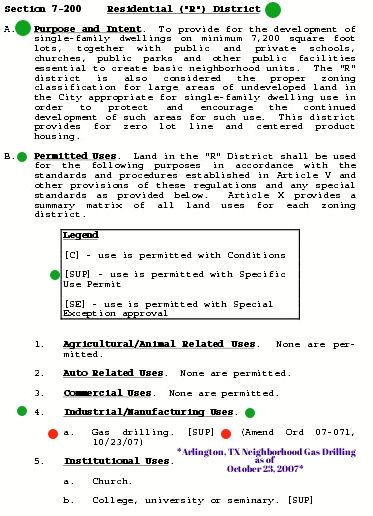
We're wondering how that vote went down? Did all City Council members (at that time) vote FOR this Amendment to the Ordinance?? Stay tuned...
Click on the Links below for More Information:
- Zoning Information/Definitions for City of Arlington, TX
- Overall Zoning Ordinance for City of Arlington, TX
- City of Arlington, TX Gas Drilling Ordinance (Specific to Gas Drilling)
From the comments...So, now we know. Thank you, Fish Creek Monitor!
**Update** ~ Click Here to Read the Shocking Results for How It All Went Down.
Wednesday, March 6, 2013
More Java Flaws Discovered

Well Java is back in the news and here is the scoop on Java's latest flaw.
This latest flaw was first discovered by security firm FireEye, which says it has already been used “to attack multiple customers.” The company has found that the flaw can be exploited successfully in browsers that have Java v1.6 Update 41 or Java v1.7 Update 15 installed, the latest versions of Oracle’s plugin.
This confirms the flaw is indeed a 0-day. For those who don’t know, “0-day” or “zero-day” this refers to a security hole that has not been publicly disclosed yet, and so doesn’t have a patch available.
Oracle released Java SE 6 Update 41 and Java SE 7 Update 15 on February 19, addressing five security fixes. This was a scheduled release, but it succeeded a previous emergency update that addressed 50 (yes 50) vulnerabilities. In February, Java exploits have resulted in computers being compromised at multiple companies, including Apple, Facebook, and Microsoft.
Since the release of Java 7 Update 15, there has been at least one new vulnerability found in Oracle’s software. Unfortunately, it’s not clear if this exploit discovered by FireEye is related or not.
On February 25, Security Explorations, a Polish security firm responsible for identifying the majority of the latest Java security holes, sent Oracle yet another vulnerability notice, including proof of concept code for two additional flaws. Oracle began investigating the same day. On February 27, it declared the first alleged issue was not a vulnerability but confirmed the second issue.
Security Explorations disagreed with Oracle’s assessment regarding the first issue and provided Oracle with further examples as part of its argument. On February 28 (the same day FireEye discovered the latest version of Java was being exploited in the wild), Oracle said it would investigate the first issue again.
I recommend that regardless of what browser and operating system you are using, you should uninstall Java if you don’t need it. If you do need it, set your Java security settings to “High” so that it prompts you before loading an applet. Check out last month's tech newsletter for more information.
Monday, March 4, 2013
Browsing on a Surface

Well here we are three years on, and we’re still waiting for that “interactive and intimate” browsing experience on iPads. I actually become acustomed to the weak internet browsing experience on my iPad. Then last week I started using the Microsoft Windows 8 Pro Surface tablet.
Reportably an astonishing 98 percent of tablet traffic is on on websites. Despite this, the actual experience of surfing the web on an iPad is underwhelming at best and often infuriating (at least to me). Simply put, today’s state-of-the-art tablet browsers, especially Safari, don’t do the Internet, the user, or the iPad justice. Apple wasn’t totally wrong back in 2010. The iPad has indeed proven itself to be a revolutionary device in many ways. Just not browsing the internet, outside of the pre-approved Apps.
Getting back to the Surface tablet. Microsoft's new device comes with Internet Explorer 10, which is the exact same version that is installed on Windows 8 desktop computers. Just think, a nice small mobile tablet with a fully functional internet interface. This has been one of the highlights for me in respect to using the new Windows 8 tablet. Don't worry IE haters, there is indead a Chrome Browser for Windows 8.
One final observation here. It's great to have Flash working on tablet.
Subscribe to:
Posts (Atom)