Thanks for a great week #1! I hope you and your children enjoyed our day together and will look forward to returning next week. Thanks parents, for your involvement in the classrooms and for those who helped in the AM and PM child care.
As much as you are able, please spend a few minutes reviewing week one memory work with your children each day. We are trying to drill in this information so they are prepared for a lifetime of learning. That takes a lot of drilling! It's wonderful that our children have peers who are encouraging and challenging them as they learn this information together. The group dynamic makes all the difference and really helps to stimulate the learning environment. We'll also look forward to seeing healthy friendships and relationships grow for all as we spend time together. Please pray for one another this week and especially the Boyer family and all of our extended family members.
As we read from Exodus 20 this week in our opening ceremony, I am praising God that as He brought the Israelites out of the house of bondage, so He has made a way for us to be free from the bondage of sin! What a Savior!
Friday, September 7, 2012

Star Trek Gets Some Google Love
Star Trek has now been around for 46+ years! It almost as old as me. Star Trek is more popular now then it was back when it originally aired. Through 5 TV series, 11 movies and even an animated series Trek really will never die. If you love Star Trek or even if you don't check out Google's "Star Trek Doodle" which will apparently be live at www.google.com through tomorrow evening. You can click around and even re-live one of Kirk's greatest battles.

I very special thank-you to dedicated readers Gerry DiNunzio and Lisa Glass for taking the time to "red alert" me on this one. I was so busy today I probably would have missed out on this very special Star Trek adventure.

I very special thank-you to dedicated readers Gerry DiNunzio and Lisa Glass for taking the time to "red alert" me on this one. I was so busy today I probably would have missed out on this very special Star Trek adventure.
Thursday, September 6, 2012
Tip of the Day - Word 2010
Open Recently-used Files With Two Keystrokes
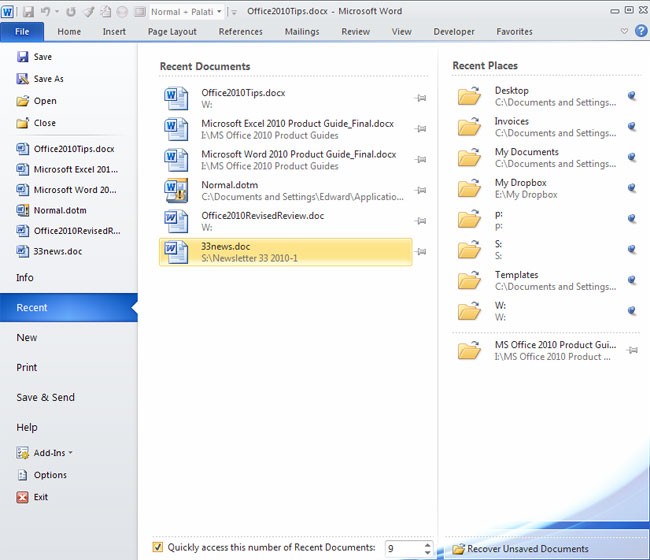
In older versions of Office, the File menu always displayed your recently-used documents, which you could open by typing Alt-F1, then the number of the document on the list (1 for the most recent, 2 for next most recent, etc.). This feature isn’t turned on by default in Office 2010, but you can activate it by entering the Backstage view, selecting Recent, and adding a checkbox next to "Quickly access this number of recent documents." Change the number to whatever number of documents you want to see on the list. In the Recent Documents list, you can "pin" a document to the list so that it will always appear, even if you haven't opened it recently. A nifty new feature lets you "pin" entire folders to the list of Recent Places in the right-hand column on the menu.
In older versions of Office, the File menu always displayed your recently-used documents, which you could open by typing Alt-F1, then the number of the document on the list (1 for the most recent, 2 for next most recent, etc.). This feature isn’t turned on by default in Office 2010, but you can activate it by entering the Backstage view, selecting Recent, and adding a checkbox next to "Quickly access this number of recent documents." Change the number to whatever number of documents you want to see on the list. In the Recent Documents list, you can "pin" a document to the list so that it will always appear, even if you haven't opened it recently. A nifty new feature lets you "pin" entire folders to the list of Recent Places in the right-hand column on the menu.
Monday, September 3, 2012
Khan Academy

Salman Kahn has earned three degrees from the Massachusetts Institute of Technology (a BS in mathematics, a BS in electrical engineering and computer science, and an MS in electrical engineering and computer science). In 2004 Khan wanted to help his cousin Nadia (remotely) in mathematics. Kahn decided to do this using Yahoo!’s Doodle notepad. When friends and relatives watched these innovative short tutorials they were amazed by the easy going educational content of Kahn's published videos on YouTube. The popularity grew so quickly that Khan quit his job and concentrated on building “Kahn Academy”, a non-profit education resource available to anyone wanting to learn. “Kahn Academy” has grown so popular and accepted that besides catching the attention of Bill Gates, school districts in California have begun using this great resource in class.
“Kahn Academy” has grown to include topics beyond mathematics, such as “history”, “astronomy” and “economics”. This type of educational web resource could turn education on its head, especially for children and young adults. It is hoped that “Kahn Academy” can begin tackling higher education as well.
If you have children in school I recommend you check it out. Signing up is free and your education or your child’s educational experience can be greatly and positively impacted by this. I really wish this amazing resource was available when my boys were going through school. If you have children in school take a few moments to check "Kahn Academy" out. It could change their lives.
Learn more at the 60 Minutes website.
Check out Kahn Academy today.
Check out Salman Kahn on TedTalks (below).
Sunday, September 2, 2012
Yet Another Rogue AV Application
Yet another fake antivirus/antimalware tool started making people’s lives miserable as August 2012 came to an end. The “Windows 8 Security System” claims to detect infections, and displays alerts to scare users into purchasing protection. The real infection, of course, is the “Windows 8 Security System” itself.
I have been asked to "clean" two computers during the past 2 weeks with this very infection and I can say it is very difficult to remove.
It appears that the evil developers of rogue antivirus software are playing up the connection to Windows 8, which Microsoft plans to release at the end of October. “Windows 8 Security System” is very similar to other fake AV products. All of these fake AV products extremely aggressive and hard to remove. In the case of this new one a victim’s system gets infected with “Windows 8 Security System” after visiting an infected website. Sadly it is easy to fall victim to rogue software like the new “Windows 8 Security System”, which extort money from PC owners to “fix” their systems. McAfee Labs recommends disabling Java in your browsers and running your antimalware software with real-time protection enabled. You should also be careful with downloading files from torrents or clicking on email and chat links.
“Windows 8 Security System” will display countless fake alerts and messages and will show a scan window on each system boot. It will display lots of detections, though it is obvious these are fake.
All of these rogue malware applications make sure that your system is compromised and that you cannot easily detect and remove the infection.
“Windows 8 Security System” alerts at the taskbar look like this:
What to do?Sometimes restoring your PC to an earlier date works, sometimes it does not. You can also try booting into safe mode (with networking) and running your real AV application. If you do this make sure to choose to scan your entire PC, not just the system files. If this still does not help additional security services like SpyBot may help. Of course if all of this does not work, backing up your personal files and completing a reformat will remove the virus. The point here is that all of these tasks will either cost you a lot of time or money. The best defense is to avoid these malicious applications by avoiding questionable websites, including torrent sites and of course never ever clicking on attachments in email if you did not specially request the file.
I have been asked to "clean" two computers during the past 2 weeks with this very infection and I can say it is very difficult to remove.
It appears that the evil developers of rogue antivirus software are playing up the connection to Windows 8, which Microsoft plans to release at the end of October. “Windows 8 Security System” is very similar to other fake AV products. All of these fake AV products extremely aggressive and hard to remove. In the case of this new one a victim’s system gets infected with “Windows 8 Security System” after visiting an infected website. Sadly it is easy to fall victim to rogue software like the new “Windows 8 Security System”, which extort money from PC owners to “fix” their systems. McAfee Labs recommends disabling Java in your browsers and running your antimalware software with real-time protection enabled. You should also be careful with downloading files from torrents or clicking on email and chat links.
“Windows 8 Security System” will display countless fake alerts and messages and will show a scan window on each system boot. It will display lots of detections, though it is obvious these are fake.

All of these rogue malware applications make sure that your system is compromised and that you cannot easily detect and remove the infection.
“Windows 8 Security System” alerts at the taskbar look like this:

What to do?Sometimes restoring your PC to an earlier date works, sometimes it does not. You can also try booting into safe mode (with networking) and running your real AV application. If you do this make sure to choose to scan your entire PC, not just the system files. If this still does not help additional security services like SpyBot may help. Of course if all of this does not work, backing up your personal files and completing a reformat will remove the virus. The point here is that all of these tasks will either cost you a lot of time or money. The best defense is to avoid these malicious applications by avoiding questionable websites, including torrent sites and of course never ever clicking on attachments in email if you did not specially request the file.
Friday, August 31, 2012
Backup The Right Way

Good old fashion backups are still necessary and should be taken seriously. One of the best ways to remember how to back up your images safely is to use the 3-2-1 rule.
I recommend storing 3 copies of any important file (a primary and two backups).
I recommend having the files on 2 different media types (such as an external hard drive and USB media), to protect against different types of problems. You can accomplish this simply by backing your files up to 2 separate external drives.
1 copy should be stored offsite (or at least offline). There are many free services so there is no excuse. I have written articles and discussed many of these free services in our training classes.
In a future article I will discuss some examples of the reasons you need to back-up such as viruses, device failure, theft and disasters.
Wednesday, August 29, 2012
Skydrive on Android

If you are not familiar with Skydrive, it’s a cloud storage service from Microsoft.
When the service was in beta stage, Microsoft was offering a cloud storage of 25 GB. Microsoft however has decreased it to 7 GB which is still greater than what is available from Google, Apple & Dropbox. Skydrive does requires you have a live login id.
Here are the official features of the new Skydrive client;
1. Access all of your SkyDrive content including files shared with you.
2. View recently used documents.
3. Choose multiple photos or videos to upload from your phone.
4. Share your files and photos – send a link in email or in another app.
5. Open your SkyDrive files in other Android apps.
6. Manage your files – delete, or create new folders.
Just like the Apple and Microsoft apps, The look of the Android draws elements from the new Windows 8 Metro UI. If you are on Android check it out. You can check out Skydrive at www.skydrive.com.
Subscribe to:
Posts (Atom)